Web pages are not like Word documents. Word is 100% WYSIWYG,
and the internal representation of Word documents is virtually
unreadable
and of no interest to the general user. Word documents cannot
be
displayed by browsers.
On the other hand, Web documents are written in a special language called HTML (HyperText Markup Language). Unlike Word's representation, HTML is readable and useful.
Simple HTML Program
<HTML>
<HEAD>
<TITLE>Your name can go
here. It will appear on the
blue title bar.</TITLE>
</HEAD>
<BODY>
<CENTER><H3>A
heading for your page ( will be centered
and medium large ) </H3></CENTER>
Additional text <BR>
<HR>
</BODY>
</HTML>
Use notepad.
File menu: new.
Type in the html code as above.
File menu: save as
Navigate to your memory stick or to you helios drive
Make a new folder on your memory stick or in a new folder on your Helios drive :
rename the NewFolder something like IntroCS (don't use spaces or special characters)
Save as type: All Files
File name: lastName.html (don't use spaces or special characters in file names)
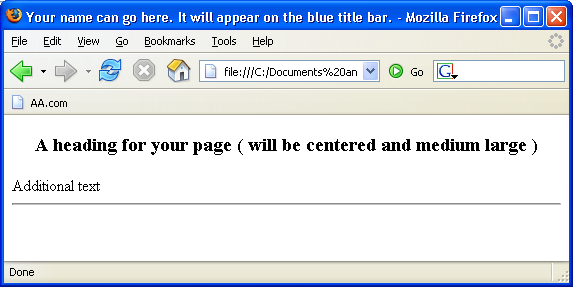
You can open this file with Firefox and it will look like: